

Enable Google Ads call reporting first. It covers most call-tracking for ads needs out of the box, feeds Smart Bidding directly, and costs nothing beyond your ad spend. Reach for a third-party platform like CallRail, WhatConverts, or CallTrackingMetrics only once you need multi-channel attribution, AI conversation scoring, or deeper CRM routing than Google’s native tools offer.
Here’s the short version of why: Google’s forwarding numbers plug straight into its own bidding algorithms, so a call that clears your quality bar counts as a conversion the same way a form fill does. Third-party tools add the layers Google doesn’t: caller scoring, keyword-level tracking across channels beyond Search, and richer dashboards for agencies juggling multiple clients.
Your first move should be one of these two:
- Turn on call reporting inside Google Ads and set a minimum call duration for a live campaign this week.
- Provision one or two test numbers in a third-party platform and run them against a small slice of traffic before committing budget.
Key Takeaways
Call tracking for ads works when Google’s native reporting handles the bidding signal and a closed-loop CRM import handles the revenue truth behind each call.
| Point | Details |
|---|---|
| Start with Google native | Enable call reporting first; it feeds Smart Bidding at no extra cost beyond ad spend. |
| Set duration thresholds carefully | Listen to real call samples before locking in a 30 to 60 second minimum. |
| Close the loop with CRM imports | Import offline conversions so call counts reflect actual sales, not just ringing phones. |
| Upgrade to third-party tools deliberately | Add platforms like CallRail or CallTrackingMetrics only when you need multi-channel attribution or AI scoring. |
| Avoid double counting | Keep only one conversion action active in your Conversions column when layering tools. |
Table of Contents
- How Call Tracking for Ads Actually Works
- Types of Call Conversions You Can Track
- Setting Up Google Ads Call Conversions Step by Step
- Native Reporting vs. Third-Party Call Tracking Platforms
- Best Practices That Keep Your Call Data Trustworthy
- What Call Tracking for Ads Actually Costs
- Eligibility, Privacy, and Consent Considerations
- How 16wmediagroup Applies Call Tracking in Local Campaigns
- Getting Started With Call Tracking the Right Way
- Where to Go for the Official Setup Docs
- Why I Think Most Advertisers Overthink This Decision
- Sources
How Call Tracking for Ads Actually Works
Every call-tracking setup, whether native or third-party, runs on the same basic trick: a phone number that only exists to be swapped out and measured. Google calls these forwarding numbers. When someone clicks your ad or lands on your site, the number they see isn’t your real business line. It’s a temporary stand-in that Google (or your tracking platform) assigns to that specific ad, keyword, or page visit.
Website tracking takes this further with Dynamic Number Insertion, or DNI. Instead of one static forwarding number sitting on your site, DNI swaps in a different number depending on the visitor’s session, source, or even the specific campaign that brought them there. That’s how a marketer can tell the difference between a call generated by a Google Search ad and one that came from an organic listing, without asking the caller a single question.
Once someone dials that number, the system logs a set of data points automatically:
- Call start time and total duration
- Caller’s phone number, where the carrier and settings allow it
- Whether the call actually connected or rang out
- Optional recording and transcription, if you’ve turned that feature on
The attribution chain runs cleanly from there: ad click leads to a forwarding number, the forwarding number logs the call, and the call, if it clears your duration threshold, becomes a conversion event in your reporting. Google Ads Help confirms there’s no extra charge for the forwarding number itself. You pay for the click like normal; the phone tracking rides along for free.
Types of Call Conversions You Can Track
Not every call your ads generate gets measured the same way, and picking the wrong conversion type is one of the more common mistakes advertisers make when they first set this up.
- Calls from ads. These come from click-to-call buttons or call-only ad formats, and they’re the easiest to attribute because the call originates directly from the ad unit itself, no website visit required.
- Calls from your website. These rely on the phone snippet or DNI running on your pages. The common pitfall here is assigning one static number to a page instead of letting the snippet rotate numbers dynamically, which flattens your attribution back to “website” instead of the specific campaign that drove the visit.
- Imported or offline conversions. These close the loop when the real outcome, an appointment booked, a sale closed, happens well after the call ends. You capture that outcome in your CRM and import it back to Google Ads on a schedule.
Minimum call duration acts as your quality filter across all three types. A one-second hang-up or wrong-number dial shouldn’t count as a lead. Practitioners commonly set that threshold between 30 and 60 seconds depending on the industry, though the more empirical approach is to listen to a sample of real calls and time how long it typically takes a genuine prospect to state what they need.
Setting Up Google Ads Call Conversions Step by Step
Getting this running correctly takes an afternoon, not a sprint. Here’s the order that avoids rework:
- Create a call conversion action in Google Ads. Decide upfront whether you’re tracking calls from ads, calls from your website, or both. This choice determines which setup path you follow next.
- Install the tracking snippet for website calls. Add the global site tag and the phone snippet directly, or deploy both through Google Tag Manager if your team already manages tags that way. Either path accomplishes the same swap of your displayed number for a dynamic one.
- Verify the swap on live traffic. Click through one of your own ads, confirm the phone number on the landing page has changed to a forwarding number, then clear your cookies and repeat the test from a fresh session. Skipping this check is how teams discover, weeks later, that the snippet never fired.
- Set your minimum duration and conversion settings. Decide whether this conversion action should be marked “Include in Conversions” so it factors into Smart Bidding, and configure whether calls get recorded.
- Build your offline import pipeline. Capture the caller’s phone number and the call’s start time in your CRM at the moment the call comes in, then either export that data using Google’s import template or connect an API feed for automatic ingestion on a recurring schedule.
Pro Tip: Run your live-click verification test from a phone on cellular data, not just Wi-Fi on your office network. Some forwarding number swaps behave differently across network types, and you want to catch that before your ad budget does.
Native Reporting vs. Third-Party Call Tracking Platforms
Google’s native call reporting handles the majority of straightforward cases well. If you’re running Search campaigns, want call data flowing into Smart Bidding without friction, and don’t need to track calls across channels beyond paid search, native reporting gets you there with zero added software cost.
Third-party platforms earn their subscription fee when your needs get more complex:
- You need attribution across multiple channels, not just Google Ads (organic, direct mail, radio, a QR code on a billboard).
- You want keyword-level call tracking that extends beyond Search into Display or Performance Max.
- You need conversation intelligence: AI-driven lead scoring, automatic transcription, or sentiment flags on incoming calls.
- Your business needs advanced call routing across locations or departments, or an agency-style dashboard managing several client accounts at once.
- Your industry requires HIPAA-compliant call handling, which native Google reporting isn’t built for.
Before you commit to either path, run through a short checklist: your estimated monthly call volume, which systems the tool needs to talk to (your CRM, your analytics stack), whether AI scoring genuinely changes how your sales team prioritizes leads, and what you’re comfortable spending on numbers and minutes each month. CallRail’s own comparison of native versus third-party tracking is a useful gut check if you’re straddling the line.
Best Practices That Keep Your Call Data Trustworthy
A duration threshold set too low is the single fastest way to poison your own reporting. If every three-second hang-up counts as a conversion, your cost-per-conversion numbers look fantastic and mean nothing. Most advertisers land somewhere between 30 and 60 seconds, but the smarter move is listening to a handful of real calls first and timing how long it actually takes a genuine prospect to explain what they need.

Closed-loop CRM integration is what separates a call count from a revenue number. Capture each call’s ID, phone number, and timestamp in your CRM the moment it lands, then attach outcome fields, appointment scheduled, deal closed, deal lost, and import those outcomes back to Google Ads as offline conversions. Without that loop, call tracking data stays a proxy at best for what actually drove revenue.
Watch for double counting. If you’ve layered a third-party platform on top of native Google reporting, make sure only one conversion action feeds your Conversions column, or you’ll inflate your numbers and confuse your bidding algorithm in the process.
A few habits worth building into your routine:
- Test every new tracking setup on live traffic before trusting the data.
- Watch how forwarding numbers behave across area codes, especially if you serve multiple regions.
- Schedule a recurring audit of your call tagging and CRM import pipeline, monthly at minimum.
Pro Tip: If your sales team already logs call outcomes in a CRM, ask them to add one extra field: “lead quality (1 to 5).” That single number, imported back to Google Ads over a few months, gives you a far better read on which campaigns produce real buyers versus tire-kickers.
What Call Tracking for Ads Actually Costs
Google’s native forwarding numbers carry no extra fee from Google itself. Your cost is the ad spend you’re already paying, plus the internal time it takes your team to set the tracking up correctly.
Third-party platforms work differently. Expect a base subscription, then per-number fees on top, then usage charges for minutes and any transcription or AI scoring add-ons. Entry-level plans commonly start around $30 to $45 a month, with your real monthly bill depending on how many numbers you provision and how much call volume runs through them.
Model this before you commit: multiply your expected number of concurrent tracking numbers by the per-number monthly fee, then multiply your projected monthly minutes by the per-minute rate. That gives you a conservative run-rate estimate instead of an unpleasant surprise on your first invoice. Watch for hidden costs too: large number inventories provisioned “just in case,” long-term recording storage, and agency setup fees that vendors sometimes bundle in separately.
Eligibility, Privacy, and Consent Considerations
Forwarding number availability isn’t universal. Google’s own documentation notes that numbers try to match local area codes but sometimes fall back to toll-free numbers, and caller ID behavior varies by country. Check this before you launch a campaign in a new region.
Call recording brings consent obligations that vary by state and by industry, so don’t treat this as an afterthought:
- Update your privacy policy to disclose that calls may be recorded and tracked.
- Mark stored recordings as secure and limit who inside your organization can access them.
- Verify your account-level call reporting settings match what you’ve disclosed to callers.
- Consult legal counsel directly if you operate in healthcare, finance, or another regulated industry.
How 16wmediagroup Applies Call Tracking in Local Campaigns
We pair call-conversion data with geotargeted placements to sharpen regional ad buys for the local businesses we work with. When a call from a specific zip code or media channel turns into a booked appointment, that signal shapes where the next month’s budget goes.
A workflow we recommend often:
- Enable Google call reporting on the campaign.
- Feed connected calls into the client’s CRM with outcome tags.
- Import offline conversions on a weekly schedule.
- Adjust local bids and placements based on which channels produce real closed business, not just ringing phones.
For the mechanics of tying local placements to measurable outcomes, our guide on measurable local advertising results walks through the same closed-loop logic in more depth.
Getting Started With Call Tracking the Right Way
If you’re managing local media buys across multiple channels, coordinating call tracking alongside your placements gets complicated fast, and that’s exactly the kind of work a dedicated media planning guide can simplify. 16wmediagroup builds tailored media plans for small and regional businesses that connect call data to real campaign decisions, not just dashboards nobody looks at twice. If your team wants help turning phone leads into a genuine ROI story, explore our services and let’s build a plan around what your calls are actually telling you.
Where to Go for the Official Setup Docs
- Track phone call conversions covers Google’s native setup mechanics in full.
- Import phone call conversions walks through offline conversion imports for closed-loop attribution.
- The ranked call tracking catalog is a practical starting point for shortlisting third-party vendors by price and feature set.
- For a broader independent perspective on the category, this call tracking marketing guide is worth a read before you commit budget.
Why I Think Most Advertisers Overthink This Decision
The conventional advice treats call tracking as a platform choice you research for weeks before acting. That’s backward. The actual bottleneck isn’t which tool you pick, it’s whether anyone bothers to close the loop between a logged call and what happened after it.
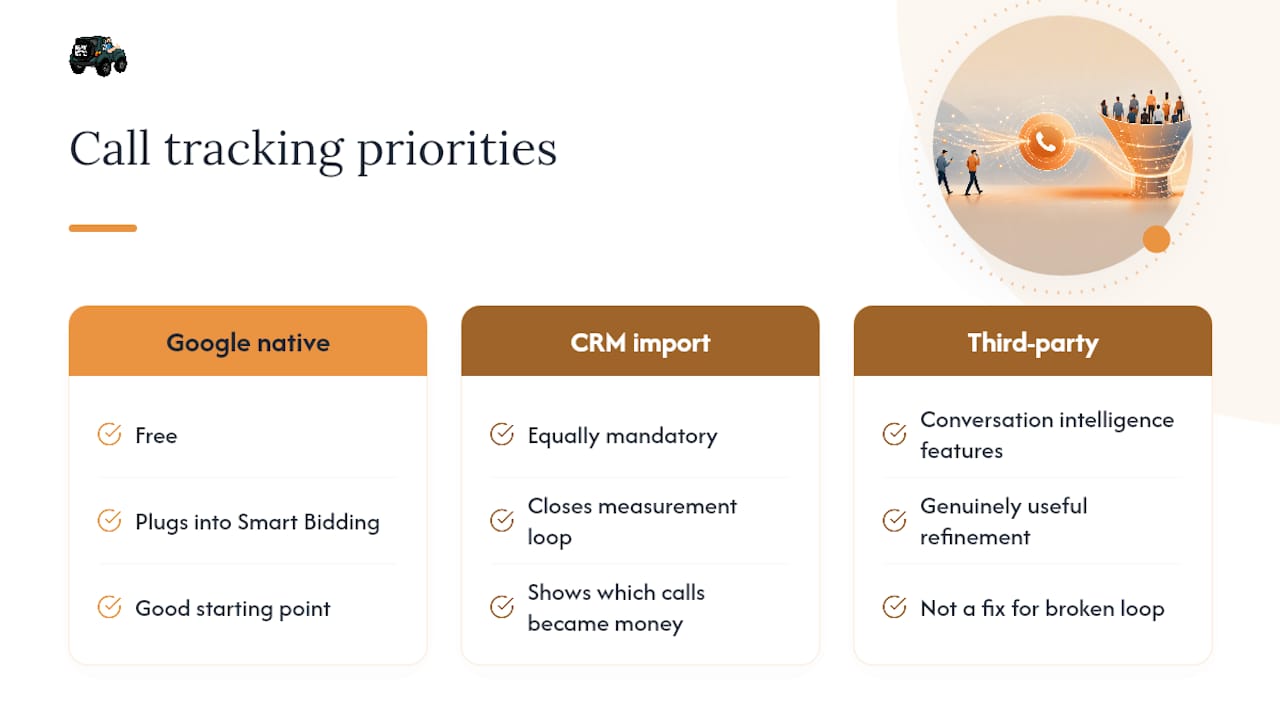
I’ve seen the pattern enough times to call it a rule: teams spend real effort turning on native call reporting, get excited about the conversion numbers climbing, and then never build the CRM import that tells them which of those calls became money. At that point, the tracking is technically working and practically useless. It’s counting phone rings, not measuring business impact.
Start with Google’s native reporting because it’s free and it plugs directly into Smart Bidding. But treat the CRM import as equally mandatory, not a “phase two” project that quietly never happens. If you only have bandwidth for one upgrade beyond the basics, spend it there before you spend a dollar on a third-party subscription. The conversation intelligence features are genuinely useful once you’ve outgrown the basics, but they’re a refinement, not a fix for a broken measurement loop.
— Mike
Sources
- Track phone call conversions – Google Ads Help
- Measure calls from ads – Google Ads Help
- What is Google Ads Call Tracking? How Does It Work? – CallRail
- 12 Best Call Tracking Tools in 2026 (Ranked Catalog)