

Zip code targeting lets you show ads only in the postal areas that matter, focusing spend where customers actually live and shop. It works on Google Ads, Meta Ads Manager, and TikTok, each with its own upload format and audience-size rules. The payoff is straightforward: higher relevance, less wasted budget, and creative that speaks directly to a neighborhood instead of a metro area. The rest comes down to setup discipline and knowing where each platform draws the line.
TL;DR:
- Using zip code targeting focuses ad spend on actual communities, improving relevance and reducing wasted budget, especially for small and mid-size local advertisers.
- Google, Meta, and TikTok each have different rules and limitations for zip code targeting, including privacy restrictions and incompatible zip formats, requiring careful list validation.
- Building effective campaigns involves validating zip lists beforehand, layering demographic filters strategically, and using local landing pages to maintain relevance.
- Performance measurement should focus on local KPIs like store visits or offline conversions, with periodic adjustments based on zip-level data rather than city-wide averages.
- When managing multiple zones or complex setups, outsourcing to experienced agencies can save time and improve results by handling platform nuances and measurement integration.
Table of Contents
- Why Zip Code Targeting Helps Local Advertisers
- How Do Google, Meta, and TikTok Handle Zip Targeting?
- Setting Up a Zip-Targeted Campaign Step by Step
- Measuring and Optimizing Performance by Zip
- What Happens When a Zip Code Won’t Target?
- Real Campaign Scenarios and an Agency Checklist
- When Should You Handle This In-House vs Hire Help?
- Let 16wmediagroup Build Your Zip-Targeted Campaign
- Sources
Why Zip Code Targeting Helps Local Advertisers
A five-mile radius sounds precise until you realize it might cover three different income brackets, two school districts, and a chunk of highway nobody drives off. Zip code advertising fixes that by letting you draw campaign boundaries around real communities instead of arbitrary circles. You’re not guessing where your customers live. You’re targeting the blocks where they actually do.
The benefits stack up fast for small and mid-size advertisers working with limited budgets:
- Efficiency — every dollar goes toward areas with proven or likely demand, not blanket coverage of a whole city.
- Relevance — creative can reference a specific neighborhood, which Nextdoor’s research on hyperlocal advertising shows drives measurably higher engagement than generic messaging.
- Cost control — you can cap spend in low-performing zips and shift it toward zips already converting.
- Localized creative — a bakery in one zip code can run a different offer than the same brand running in a zip ten minutes away.
Retail grand openings, ticketed events, service-area businesses like plumbers or landscapers, real estate listings, and healthcare practices with defined referral areas all benefit from this kind of local zip code campaign. Where it makes less sense: national e-commerce brands with no shipping restrictions, or campaigns where the audience is defined by interest rather than geography. In those cases, interest-based or lookalike targeting layered with a broader region usually performs better than tight zip constraints.
How Do Google, Meta, and TikTok Handle Zip Targeting?
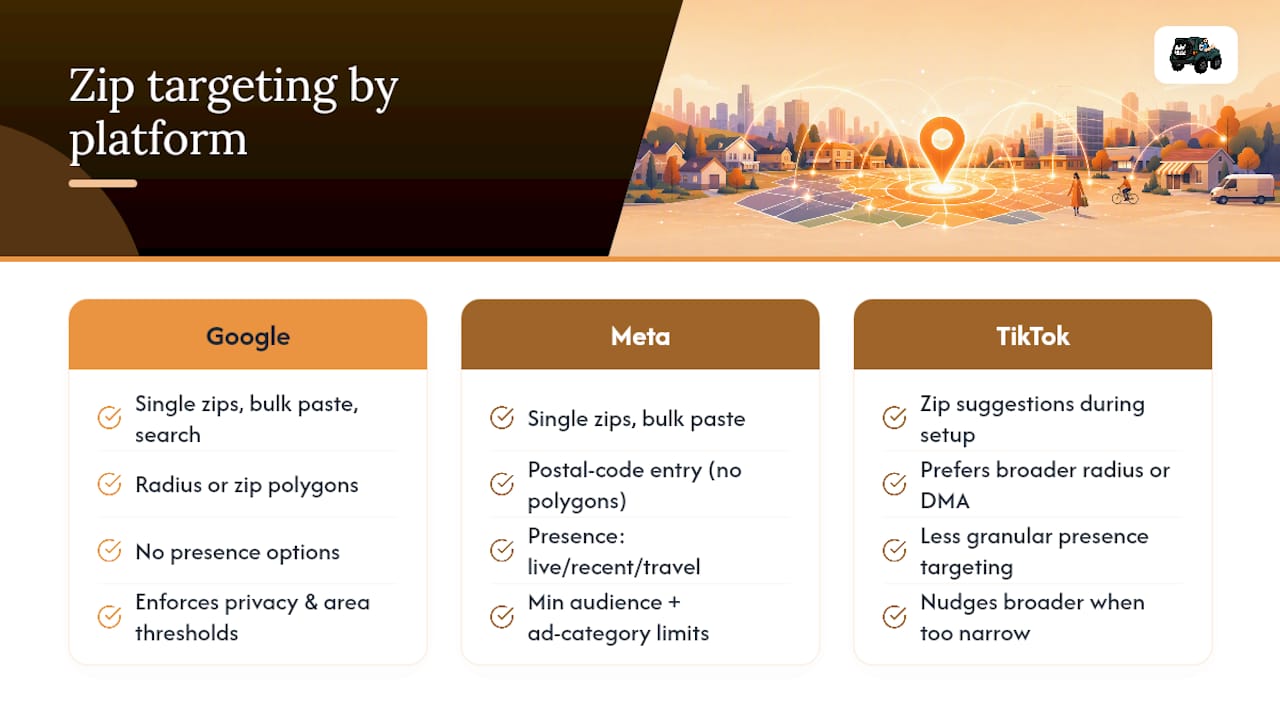
Each major platform supports targeted advertising by zip code, but the mechanics and the guardrails differ enough to trip up anyone assuming they’re interchangeable.
Google Ads lets you enter individual zip codes, paste a bulk list, or use its advanced search tool to pull zips within a radius of an address. Google enforces privacy and area thresholds, so it can reject postal codes tied only to PO boxes or areas too small to protect user anonymity, per Google’s own location targeting guidance. You also choose between radius targeting and zip-based polygons, and the two rarely produce identical reach.
Meta Ads Manager takes a different approach. Beyond simple postal-code entry, it offers presence options: people who live in an area, were recently in it, or travel through it regularly. According to Meta’s business help documentation, campaigns targeting very small zips can fall below Meta’s minimum audience threshold, which limits or blocks delivery entirely. Certain ad types, including some housing and employment categories regulated under fair-advertising rules, carry additional location restrictions.
TikTok offers zip-level suggestions inside ad group setup, though its geographic targeting tools are less granular than Google’s or Meta’s. Expect TikTok to nudge you toward broader radius or DMA targeting when a zip list gets too narrow.
One consistent gotcha across all three: invalid zip prefixes, PO-box-only codes, and non-U.S. formats will silently fail or get rejected during bulk upload, so validate your list before you paste it.
Setting Up a Zip-Targeted Campaign Step by Step
Good zip code audience segmentation starts before you ever open the ad platform. Pull your own customer zips from a CRM or point-of-sale system, layer that against a sales heatmap if you have one, and rank zips by revenue or visit frequency. That data tells you where to spend first, rather than guessing based on drive-time assumptions.
Once you know your target zips, the build itself follows a predictable path:
- Open campaign settings and navigate to the locations tab.
- Use advanced search to pull zips by radius, or switch to manual entry.
- Bulk paste your zip list or upload a CSV, keeping one code per line.
- Preserve leading zeros. A zip like “02134” can get truncated to “2134” in spreadsheet software and rejected on upload.
- Set exclusions for zips you know convert poorly, and consider donut or radial exclusion logic to carve out an inner area you’re already covering through another channel.
- Check the platform’s maximum locations per campaign before finalizing. Google Ads caps this, and hitting the ceiling forces you to split into multiple campaigns.
- Layer demographic filters carefully. Stacking income, age, and interest targeting on top of a tight zip list can shrink your audience below a deliverable size fast.
Pro Tip: Run every zip list through a validation check before upload, whether that’s a spreadsheet formula or a script that flags non-numeric characters and truncated codes. A single malformed entry can cause the entire bulk-paste batch to fail, and platforms don’t always tell you which line broke it.
If you’re running Smart Bidding, know that automated bid strategies can dilute tight geographic signals over time. When precise zip control matters more than algorithmic efficiency, manual bidding or firm exclusions keep your boundaries intact.
Measuring and Optimizing Performance by Zip
Tracking performance at the zip level only works if you pick KPIs that actually reflect local behavior. Cost per acquisition, return on ad spend, conversion rate, and store visit data (or an offline proxy like coupon redemptions) all give you a cleaner read than city-wide averages, which tend to hide which specific areas are carrying the campaign.
A simple test design works well: hold out a few comparable zips with no ad exposure, run matched creative in the active zips, and rotate which zips are active on a set cadence, maybe every two to four weeks. That gives you a baseline to compare against.
From there, optimization is mostly reallocation:
- Exclude zips with consistently high spend and low conversion.
- Increase bid adjustments on top-performing zips rather than the whole campaign.
- Shift budget from underperforming areas into your proven zips monthly, not daily. Zip-level data is noisy enough that daily shifts often chase randomness.
One caution: small-sample zips can show wild swings in cost per acquisition purely from low volume, and offline conversion tracking (foot traffic, phone calls) always carries some attribution lag. Don’t overreact to a single bad week from a zip that only gets a handful of clicks.
What Happens When a Zip Code Won’t Target?
Platforms block or limit zip targeting for a few predictable reasons, and most have a workaround.
Privacy and minimum audience thresholds are the most common blocker. If a zip’s population is too small or the ad type falls under stricter rules, platforms won’t let you target it in isolation.
PO-box-only zips typically have no residential population attached, so ad platforms treat them as non-targetable. Google’s guidance recommends targeting the surrounding area instead of trying to force the isolated code.
ZCTA mismatches are a quieter problem. The zip shapes ad platforms use are often built from Census ZCTA boundaries, which approximate USPS zip codes but don’t always match them exactly, so your expected reach can differ from the mailing-list version of that same zip.
When you hit a wall, a few fixes usually work:
- Pre-validate lists with a spreadsheet check or a script before uploading.
- Select an adjacent, targetable zip and document the substitution in your test notes.
- Fall back to a small radius from a known address instead of the blocked code.
- Widen to city or DMA-level targeting if the entire zip cluster is thin.
Real Campaign Scenarios and an Agency Checklist
A grand opening for a Tampa retail client works best with a tight zip radius around the store, creative referencing the neighborhood by name, and foot traffic as the primary KPI. A premium home-services client, by contrast, needs zips selected for household income data, tone that matches a higher price point, and phone calls or booked consultations as the conversion signal.

Before launch, 16wmediagroup runs every campaign through the same checklist: pull customer data, validate zip lists, localize creative per area, build local landing pages, and confirm measurement is wired up before the first dollar spends.
Pro Tip: Never launch a zip-targeted campaign without local landing pages. Sending zip-specific traffic to a generic homepage kills the relevance you just paid to build.
When Should You Handle This In-House vs Hire Help?
A single zip list and one ad platform is manageable in-house. Once you’re running multiple zip clusters across Google, Meta, and TikTok with different creative per area and offline measurement to reconcile, the coordination cost adds up fast. That’s usually the point where an agency earns its keep. Localized community-based advertising and creative work benefits from someone who’s built out zip strategies across categories before, not just once.
— Mike
Let 16wmediagroup Build Your Zip-Targeted Campaign
Running zip code targeting well means juggling three ad platforms, validated zip lists, localized creative, and measurement that actually ties back to local businesses in southern California, foot traffic, or phone calls. 16wmediagroup handles that entire stack for local businesses, so you skip the trial-and-error of figuring out which zips convert and why a bulk upload keeps failing.
Our team builds localized marketing strategies around your actual customer data, not guesswork about where your audience lives, and we handle creative localization and measurement setup so every zip in your campaign is pulling its weight. If you’re ready to see what a properly built zip strategy looks like for your business, check out our local advertising best practices guide and reach out to start building your media plan.
Sources
For exact interface steps and definitions, go straight to the source:
- Google Ads location targeting
- About location targeting in Meta Ads Manager
- The new era of hyperlocal advertising — Nextdoor
- ZCTA (ZIP Code Tabulation Areas) guidance — U.S. Census