

Yes, add a QR code to that print ad, but only if you build the mobile landing experience first. Pick a dynamic code for anything running in batches or needing updates, and a static code only for truly permanent placements. Before the press run, print a physical proof and scan it on a real phone under real lighting. Skip that step and you’re printing a paperweight.
TL;DR:
- Using dynamic QR codes for campaigns allows easy URL updates and better tracking across multiple print batches, while static codes suit unchangeable destinations like business cards.
- QR codes should be at least 3 to 5 centimeters in size and placed where the eye naturally lands, with clear CTA instructions to boost scan rates.
- Designing a high-contrast, error-corrected, and properly sized QR code with a visible short URL or context text increases trust and scanning likelihood.
- A physical proof is essential to verify the code’s quality and readability under real lighting conditions before mass printing.
- Successful campaigns pair specific print formats with targeted, single-purpose mobile actions that mirror the ad’s promise, supported by accurate measurement methods.
Table of Contents
- What Are the Benefits of QR Codes for Print Advertising?
- Where Should You Put QR Codes in Print Ads? Use Cases and Examples
- What Are the Technical Specs for Print-Ready QR Codes?
- What Size Should a QR Code Be for Print Ads?
- Should You Use a Dynamic or Static QR Code?
- How Do You Design a QR Code That People Trust Enough to Scan?
- What Are the Legal and Privacy Considerations for QR Codes in Print Ads?
- What Are the Most Common QR Code Mistakes in Print Advertising?
- What Do Successful Print QR Campaigns Have in Common?
- The 16W Media Group Take on QR-Enabled Print
- Ready to Run a QR-Enabled Print Campaign That Actually Reports Back?
- Sources
What Are the Benefits of QR Codes for Print Advertising?
Print advertising has always had one weakness: you spend the money, then you wait and hope. QR codes close that gap. They turn a static flyer, magazine spread, or billboard into something you can actually measure, and they let a reader jump straight from paper to a mobile action without typing a single character.
The adoption curve backs this up. Scanning has become mainstream behavior among U.S. smartphone users, which means a well-placed code on a flyer or ad insert isn’t a novelty anymore. It’s a channel your audience already knows how to use.
Three benefits matter most for anyone running print campaigns:
- Measurability. Every scan is a data point. Pair it with a UTM-tagged landing page and you know exactly which placement, publication, or print run generated the response.
- Expanded real estate. A business card or brochure only has so much space. A code lets you point to a video demo, a booking calendar, or a full product catalog without cramming more text onto paper.
- Low-cost testing. Dynamic codes let you swap the destination URL after printing, so you can test offers or fix a broken landing page without reprinting anything.
Where Should You Put QR Codes in Print Ads? Use Cases and Examples
Matching the QR destination to the print format is where most campaigns either click or fall flat. The code itself is easy. Sending scanners somewhere useful is the actual skill.
- Flyers for events. Point the code straight to an RSVP form or ticket page, not a general event website. A reader scanning mid-stride wants one action, not a menu of links.
- Restaurant menus. Send scanners to a mobile-formatted menu page, never a PDF. PDFs render poorly on phones and often require a download, which kills momentum instantly, as Jotform’s flyer guidance points out.
- Business cards. Use a vCard destination so the scan saves contact details directly into the phone, no retyping required.
- Direct mail. Link to a coupon or offer landing page that mirrors the mailer’s exact promotion. Consistency between the printed offer and the digital page keeps trust intact.
- Magazine ads. Use the code to unlock something print can’t do, like a product gallery or a short video demo.
- Billboards and large-format placements. Follow a distance-to-size rule: the farther the expected viewing distance, the larger the code needs to be, and the CTA copy needs to work at highway speed, not reading-room pace.
Every one of these pairings shares a rule: the QR destination should feel like a continuation of the ad, not a detour.
What Are the Technical Specs for Print-Ready QR Codes?
Design a QR code without production specs in mind and you’re gambling with the whole ad budget. Format, resolution, and contrast decisions made on a screen don’t always survive the press.
Export the code as SVG whenever your print vendor accepts vector files. Vector art scales cleanly to any final size without pixelation. If you must use a raster file, export a PNG at 300 or more DPI at the actual final print dimensions, never scaled up afterward. Avoid JPEG entirely. JPEG compression introduces artifacts around the sharp edges of QR modules, and that’s exactly the kind of noise that confuses a scanner.
A few non-negotiable production rules:
- Use error correction Level H whenever you’re adding a logo overlay or decorative elements, since it tolerates the most damage or obstruction.
- Preserve a quiet zone of at least four modules of blank space around the code. Crowding text or graphics into that margin is one of the most common causes of failed scans.
- Maintain a contrast ratio of at least 4:1 between the code and its background. Branded colors are fine as long as that contrast holds.
- Keep any logo overlay to roughly 25 to 30 percent of the code’s total area at most.
Pro Tip: Digital previews on a laptop screen can hide press artifacts that only show up on paper. Always pull a physical proof and inspect it under a magnifying glass or loupe before approving the full run.
What Size Should a QR Code Be for Print Ads?
Size and placement decide whether a reader even attempts a scan, let alone completes one.
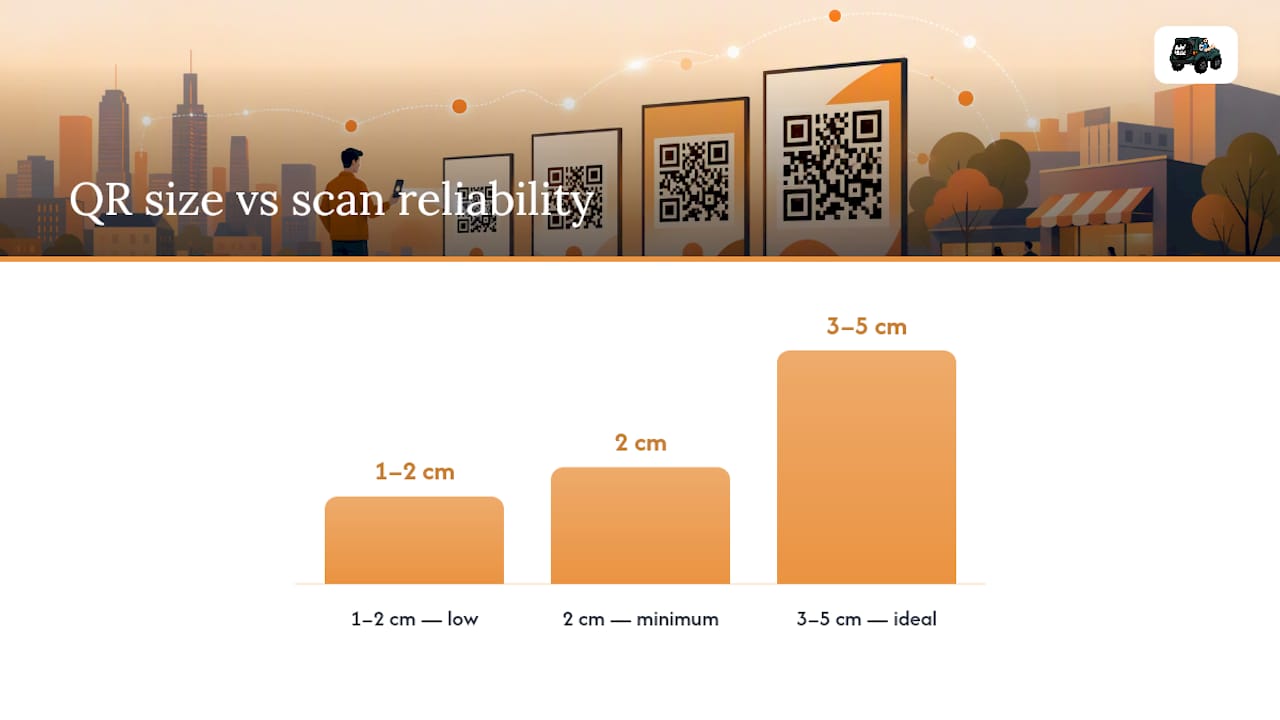
For most printed pieces, 2 centimeters is the minimum workable size, and that’s cutting it close. A 3 to 5 centimeter code on a standard flyer or brochure page is the sweet spot for scan reliability at a comfortable arm’s length. Anything in the 1 to 2 centimeter range fails often enough on most printed materials that it isn’t worth the risk.
Placement matters as much as size. Put the code where the eye naturally lands after finishing the ad copy, typically the bottom-right corner on a standard flyer layout. Keep it clear of trim lines and bleed margins so a slight press shift doesn’t clip the quiet zone.
CTA copy is the other half of the equation, and it’s the part most design teams skip. A bare code with no instruction leaves readers guessing what happens next.
- Scan to RSVP
- Scan for menu
- Scan to claim a discount
Keep the CTA between three and seven words, set in type no smaller than 10 to 12 points. Visible context next to the code also reduces hesitation, since design research on flyer scan rates shows readers scan more readily when they know exactly what to expect on the other side.
Should You Use a Dynamic or Static QR Code?
The choice between dynamic and static comes down to one question: will anything about this campaign need to change after the ink dries?
- Use dynamic codes for events, promotions, A/B tests, and any campaign running across multiple print batches. Dynamic codes let you edit the destination URL after printing, which matters when you want to swap in a different offer, fix a broken link, or route separate print runs to separate landing pages for attribution comparisons.
- Use static codes only for content that will never change, such as a vCard on a business card or a permanent menu URL on a laminated table tent. Static codes encode the destination directly, so there’s nothing to manage after printing, but also nothing to fix if the link breaks.
- Build tracking into the URL itself, regardless of code type. Add UTM parameters (campaign, source, medium, content) to every landing page URL, and generate a distinct short URL for each placement so scans from a magazine insert don’t get lumped in with scans from a direct mail piece.
Before the campaign launches, run a test scan and confirm the UTM values actually land in your analytics platform. A code that scans fine but drops its tracking parameters gives you traffic with no way to trace where it came from.
Pro Tip: Name your UTM campaign and content parameters using a consistent convention, like “flyer_downtown_march” instead of “flyer1,” so six months of print history stays sortable and comparable.
How Do You Design a QR Code That People Trust Enough to Scan?
A code that looks legitimate gets scanned more than one that looks generic or suspicious, and legitimacy is a design choice you control.
Branded codes with a small, centered logo tend to increase scan initiation, since readers associate the branding with a known business rather than an anonymous black-and-white square. Keep that overlay small and pair it with Level H error correction so the extra graphic doesn’t compromise readability, a balance flyer design research confirms works well when contrast is preserved.
Print a visible short URL or a one-line context statement near the code, something as simple as “Visit 16wmediagroup.com/offer.” This does double duty: it tells scanners exactly where they’re headed, and it gives people without a scanner app an alternative path. The FTC has warned that scammers hide malicious links inside QR codes, and visible context is the simplest way to signal your code isn’t one of them.
Avoid low-contrast color pairings, busy photographic backgrounds behind the code, and printing it under a glossy varnish or across a fold. Any of those can scatter light or break the code’s continuity enough to stop a scan cold.
What Are the Legal and Privacy Considerations for QR Codes in Print Ads?
QR codes carry real legal exposure if you treat them casually, mostly around privacy disclosure and consumer protection.
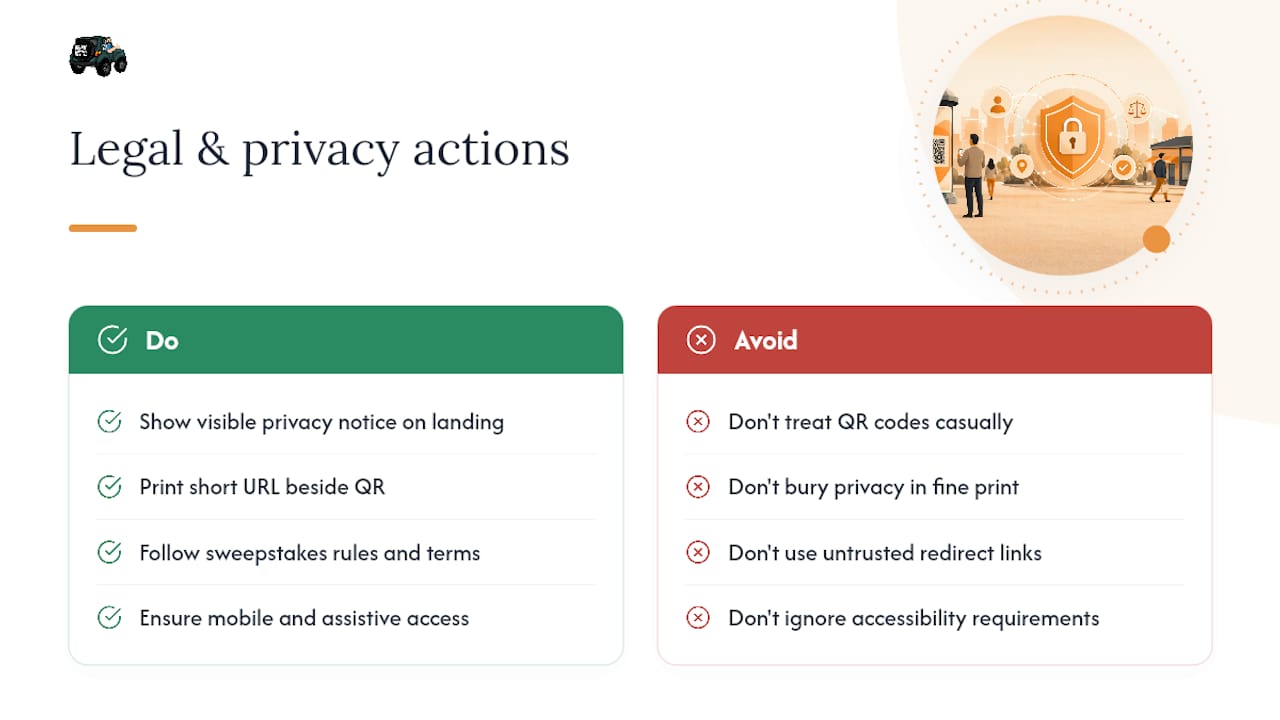
If the landing page collects personal information, a name, email, or phone number for a coupon or contest, that page needs a visible privacy notice explaining what you collect and why, consistent with standard data collection disclosure practices in the United States. Don’t bury this in fine print on the flyer. Put it on the landing page itself, where the data is actually being gathered.
Consumer trust is the bigger risk. The FTC’s consumer alert on QR code scams exists because bad actors have used fake codes to redirect victims to phishing sites or malware downloads. That means your own legitimate ad now competes for trust against a genre of scam the public has been warned about. Printing a visible short URL next to the code, as covered above, isn’t just a design nicety. It’s a direct countermeasure against that skepticism.
If your campaign runs a sweepstakes or contest through the QR landing page, standard state-level contest and sweepstakes rules apply just as they would for any digital promotion, including official rules, eligibility terms, and no-purchase-necessary language where required.
Finally, if the code links to a video, downloadable coupon, or app store listing, make sure that destination itself complies with accessibility basics. A landing page that fails on mobile or excludes assistive technology users creates the same liability a poorly designed website does, regardless of how the traffic arrived.
What Are the Most Common QR Code Mistakes in Print Advertising?
Most QR failures trace back to a handful of repeatable mistakes, and nearly all of them show up before the ad ever reaches a reader.
The biggest one: linking to a homepage instead of a purpose-built landing page. A scanner who just saw a flyer for a Saturday sale doesn’t want to hunt through a full website menu to find that same offer. The landing page needs to repeat the ad’s exact message, a principle Jotform’s flyer guide stresses precisely because mismatched expectations kill conversions.
Printing the code too small is a close second. Designers often size a code to fit a layout rather than to fit a realistic scanning distance, and a code that looks fine on a screen can be unreadable at 3 to 5 centimeters when actually printed on cheap paper stock.
Other recurring errors:
- Skipping the physical proof and approving the design straight from a digital mockup.
- Using a static code for a campaign that later needs a destination change, forcing a costly reprint.
- Forgetting UTM parameters entirely, which leaves scans invisible in analytics even when the code itself works perfectly.
- Placing the code over a fold line, staple, or perforation, all of which can physically break the pattern.
- Choosing a low-contrast color scheme to match brand aesthetics, then discovering the code fails to scan under fluorescent store lighting.
Every one of these is preventable with a five-minute proof test before the print run ships.
What Do Successful Print QR Campaigns Have in Common?
The campaigns that work share a pattern: a specific print format, paired with a specific mobile action, measured through a dedicated landing page.
A direct mail piece offering a discount code performs best when the QR destination is a single-purpose coupon page that mirrors the mailer’s offer word for word, rather than a general store locator. A magazine insert promoting a new product line sees stronger engagement when the code opens a short video demo instead of a static product photo gallery, since video gives readers something print physically cannot offer. Event flyers that link directly to a mobile RSVP form, skipping any extra navigation, tend to convert scans into confirmed attendance at a noticeably higher rate than flyers linking to a general event website.
The common thread across all three: the print piece makes a promise, and the QR code delivers on that exact promise within one tap, no digging required. Campaigns that instead treat the QR code as a generic “learn more” button, pointing to a homepage or a broad landing page, consistently underperform because the mobile experience breaks the momentum the print ad just built.
Print-plus-QR pairings that use per-placement dynamic codes also make it possible to compare formats directly, showing whether a community magazine insert or a direct mail drop actually drove more completed actions rather than just more impressions.
The 16W Media Group Take on QR-Enabled Print
QR codes work best when they’re treated as connective tissue between a printed impression and a digital action, not as an afterthought slapped in the corner. 16wmediagroup builds that connection directly into community magazine placements and regional print buys, because a scan that never gets measured is just a design element.
The mistake often isn’t technical. It’s strategic. Many build a beautiful code but forget to build the landing page that makes the scan worth taking. Print still earns attention in ways digital ads often don’t, but that attention needs somewhere useful to go.
If you’re weighing whether your next print run needs a QR strategy, ask for a campaign checklist walkthrough before you finalize the design.
— Mike
Ready to Run a QR-Enabled Print Campaign That Actually Reports Back?
Some agencies hand you a print ad and call it done. A comprehensive approach involves media planning, print-ready QR specs, a mobile landing page built for the exact offer, and the tracking setup that tells you which placement actually earned its budget.
Handling parts that trip up most in-house teams, from choosing dynamic versus static codes to setting UTM parameters that map cleanly to conversions, is key. Whether placing an ad in a community magazine, a direct mail drop, or a regional print buy, building the code, the destination, and the measurement plan as one package simplifies the process. That’s the difference between a QR code that looks nice and one that produces a number you can report.
Get a walkthrough of our local advertising best practices and find out what a QR-enabled print plan could look like for your next campaign at 16wmediagroup.
Sources
- FTC — Scammers hide harmful links in QR codes
- Statista — U.S. smartphone users who scan QR codes
- EZQR — QR codes for flyers: size, format, tracking, print-ready files