

Yes, you can put your video ad in front of people in one ZIP code, one city, or a five-mile radius around your storefront. YouTube ads through Google Ads support city, state, county, DMA, ZIP, and custom radius targeting, and the fastest path to using it is creating a Video campaign and setting your location targets before you touch anything else. One warning up front: stack too many audience filters on top of a small location, and you can choke your own reach before the campaign even starts.
TL;DR:
- Using a small radius or ZIP code targeting can significantly increase CPCs and CPVs, requiring higher bids to reach high-value local audiences.
- Layering additional audience layers, such as remarketing or interest segments, further shrinks reach and requires careful monitoring of potential reach estimates.
- Starting with a modest local campaign budget and testing for at least two weeks helps the algorithm optimize for viewers who actually convert within the targeted area.
- Exact location targeting options include country, state, city, county, ZIP code, DMA, and custom radius, chosen based on how well your customers identify with your service area.
- Creative content should mention local landmarks and neighborhood details to improve engagement and relevance for nearby viewers.
Table of Contents
- What Geographic Targeting Options Does YouTube Support?
- How Do You Set Up Location Targeting for a YouTube Video Campaign?
- Why Does Layering Audiences Shrink Your Reach?
- What Should You Budget for a Local YouTube Campaign?
- How Do You Measure and Optimize a Local YouTube Campaign?
- Practitioner Tips and Proof Points From 16W Media Group
- Ready to Run a Local YouTube Campaign Without the Guesswork?
- Sources
What Geographic Targeting Options Does YouTube Support?
Google Ads gives you six ways to draw your service area, and each one solves a different problem. Location targeting in Google Ads covers country, state, city, county, ZIP code, Designated Market Area (DMA), and a custom radius around a street address. Picking the right one is less about preference and more about how your customers actually find you.
- Country or state: Best for brands selling online with no physical storefront tying them to one town.
- City or county: Fits a salon, gym, or clinic that draws from a defined metro but doesn’t need pinpoint precision.
- DMA (Nielsen market area): Matches how local TV and radio buys work, useful for brands used to thinking in broadcast markets like Tampa or Orlando rather than city lines.
- ZIP code: The sharpest option for a real estate agent working three neighborhoods or a contractor who only services certain postal codes.
- Address radius: Ideal for a café or boutique that knows most walk-in traffic comes from within two miles.
A tourism board promoting a weekend festival might target an entire DMA to catch day-trippers. A dentist opening a second location should probably start with a five-mile radius and a ZIP-level exclusion list to avoid overlapping with the original office.
How Do You Set Up Location Targeting for a YouTube Video Campaign?
Setting this up correctly the first time saves you from rebuilding a campaign after it’s already spent money on the wrong audience.
- In Google Ads, start a new campaign and select Video as the campaign type, then choose a goal (leads, sales, or awareness) that matches what you’re actually trying to accomplish.
- Choose your networks. YouTube Help recommends keeping Google video partners enabled to extend reach beyond YouTube itself, including Google TV inventory now available across the U.S.
- Scroll to Locations in campaign settings and enter your city, ZIP codes, DMA, or a radius around your business address.
- Set language targeting to match how your local customers actually search and watch.
- If offered, choose “presence” targeting (people physically in the location) over “presence or interest” for genuinely local businesses. A user in Ohio who’s merely searching for “Tampa restaurants” isn’t your customer.
- Before saving, check the potential reach estimate Google Ads displays. If it looks too thin, that’s your cue to widen before you launch, not after.
- Save the campaign and launch with a modest budget as a live test rather than committing your full monthly spend on day one.
Pro Tip: Run your first local video campaign for two weeks before judging it. YouTube’s algorithm needs a short learning period to figure out which viewers in your target area actually convert, and pulling the plug on day three tells you nothing useful.
Why Does Layering Audiences Shrink Your Reach?
Location targeting doesn’t stack with other audience layers, it intersects with them. YouTube Help explains that adding a remarketing list on top of a location target reaches only people who satisfy both conditions, not everyone who fits either one.
That intersection effect gets dangerous fast in small local areas. A ZIP code with 8,000 households, filtered further by an in-market audience and a custom intent list, can shrink to a few hundred eligible viewers, sometimes too few for automated bidding to find enough data to optimize.
Use these layers deliberately rather than by default:
- Customer Match for excluding recent buyers from awareness ads, which preserves budget and lowers cost per acquisition on conversion campaigns.
- In-market and custom intent audiences to reach people in your city actively researching your category, not just anyone who lives there.
- Content exclusions to keep your ad off inventory that doesn’t fit your brand.
Check the potential reach number in the Ads UI every time you add a filter. If reach craters after adding a single audience layer, remove that layer before removing your location target.
What Should You Budget for a Local YouTube Campaign?
Ad format drives cost more than most local advertisers expect. Skippable in-stream ads charge only when someone watches 30 seconds or the whole video, which favors direct-response goals. Bumper ads (six seconds, non-skippable) guarantee an impression but cost more per thousand views since there’s no skip option working in your favor. Shorts placements tend to run cheaper per view but reward punchier, vertical creative over a polished 30-second spot.
- Match bid strategy to your goal: maximize conversions for lead generation, target CPA once you have conversion data, or straightforward CPV bidding for pure brand awareness.
- Start with a small test budget and scale based on which locations perform, rather than committing your full budget to one geography from day one.
- Tight radius or ZIP targeting can push CPCs and CPVs higher because you’re competing for a smaller pool of impressions. Compensate with slightly higher bids rather than abandoning the narrow target entirely.
Pro Tip: If your CPV spikes the moment you narrow to a five mile radius, that’s not a sign the campaign is broken. It’s a sign you’re finally reaching people worth paying more for.
How Do You Measure and Optimize a Local YouTube Campaign?
Track the metrics that actually tell you whether nearby viewers are converting, not just watching.
- Prioritize view rate and click-through rate early to gauge creative performance, then shift focus to conversions and, where available, store visit or local action metrics.
- Set up conversion tracking in GA4 and import those conversions into Google Ads so bidding algorithms can optimize toward actual sales or leads, not just clicks.
- A/B test creative variations by micro-area. A message that lands in one neighborhood might fall flat two ZIP codes over.
- Apply location bid adjustments where performance diverges. Raise bids where cost per acquisition is strong, and either widen the geography or pull back spend where a location underperforms.
- If potential reach ever looks too thin to sustain a stable campaign, widen the radius or drop an audience layer before you widen your budget.
Practitioner Tips and Proof Points From 16W Media Group
Local creative wins when it names the place, not just the audience. Mention the actual neighborhood, drop a local landmark, and close with a call to action that fits the geography (“Stop by our Ybor City location this week”) rather than a generic tagline.
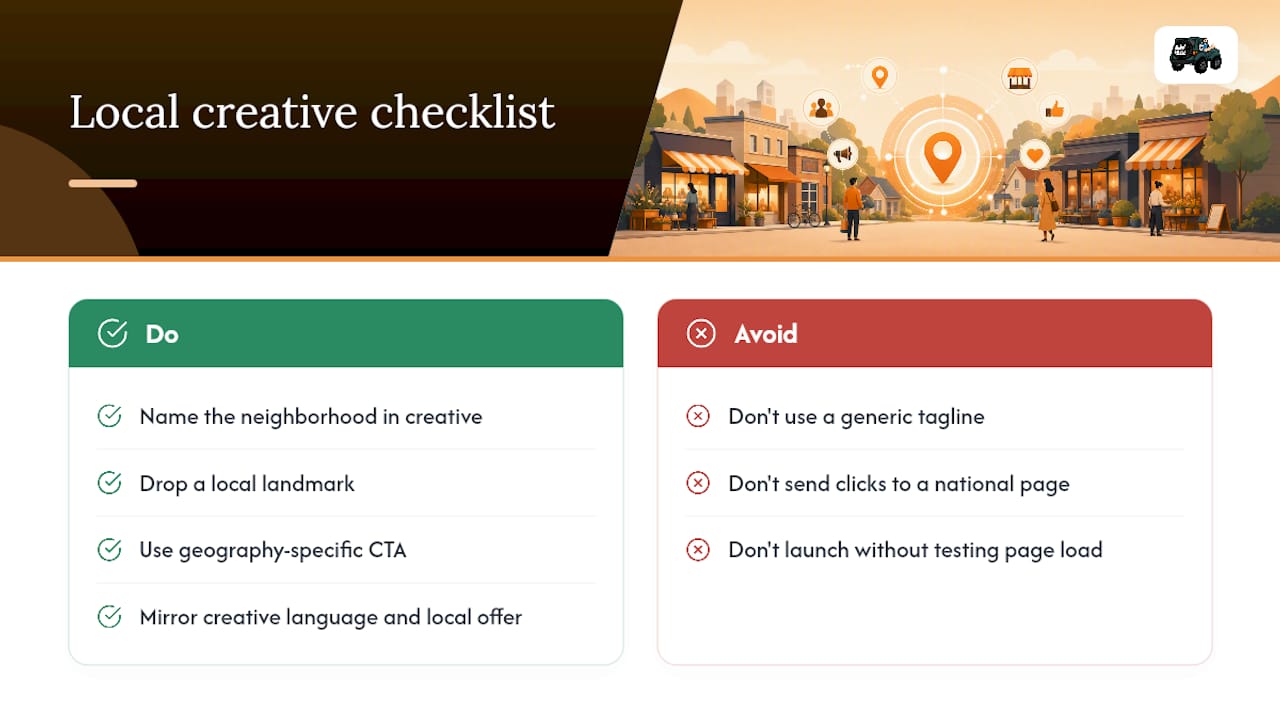
Before launch, confirm your landing page loads fast, states a local offer clearly, and mirrors the creative’s language. A viewer who clicks from a ZIP-targeted ad expects to see their town mentioned again, not a generic national page.
For businesses that want a full local advertising playbook built around these same principles, that resource walks through positioning across channels beyond video alone.
— Mike
Ready to Run a Local YouTube Campaign Without the Guesswork?
Running a tight, well-targeted YouTube campaign takes ongoing attention: watching reach numbers, adjusting bids by ZIP, refreshing creative before it fatigues. An agency can build and manage that process for local businesses so the owner isn’t the one staring at the Ads dashboard every morning.
Some agencies handle the media plan, the creative direction, the targeting setup, and the measurement loop, all tuned to a business’s actual service area rather than a one-size-fits-all radius. DIY works fine if you have hours each week to test and adjust; hiring it out makes sense once you’d rather spend that time running the business the ads are promoting. For a broader look at audience targeting strategy before you commit, that’s a useful primer on how the pieces fit together.
Start by reviewing the Local Advertising Best Practices guide and requesting a media plan built around your specific neighborhoods, not a generic metro-wide guess.
Sources
- Target ads to geographic locations – Google Ads Help
- YouTube advertising: The ultimate guide
- YouTube Ads In 2026: The Complete Strategy Guide