

The fastest way to improve your podcast’s search visibility is to publish a stable episode page on your own domain with an optimized title, a full transcript, episode metadata, and PodcastEpisode structured data. That single bundle of assets does more for discoverability than any other single action because it gives search crawlers something to read, index, and rank. Here are the seven high-impact tasks to do right now:
- Create one episode page on your site and publish the full transcript in crawlable HTML.
- Put the primary keyword in the episode title and in the show subtitle field.
- Write 150–300 word show notes with timestamps above the fold.
- Add PodcastEpisode JSON-LD and a self-referencing canonical to every episode page.
- Validate your RSS feed with Podbase or Castfeedvalidator, then submit to Apple Podcasts, Spotify, and YouTube Music.
- Add internal links between related episodes and secure at least one outreach backlink per month.
- Track performance in Google Search Console alongside your hosting analytics.
Why does this bundle move the needle? Search engines cannot listen to audio. Every ranking signal they use comes from text: your episode page, the transcript, the title tag, the structured data, and the links pointing at your content. Directories like Apple Podcasts and Spotify run a separate indexing track based on RSS metadata and engagement signals. Optimizing both tracks compounds over time, building domain authority and in-app visibility simultaneously. The checklist above covers both tracks in one production session.
Key Takeaways
Podcast SEO compounds over time: every transcript, episode page, and backlink you publish today keeps generating search impressions months after the episode airs.
| Point | Details |
|---|---|
| Transcripts are the primary signal | Publish full transcripts in crawlable HTML on every episode page to give search engines indexable text. |
| Front-load keywords in titles | Place the primary keyword in the first 5–7 words of the episode title for both directory and web search ranking. |
| PodcastEpisode schema + canonical | Add JSON-LD structured data and a self-referencing canonical to every episode page so Google indexes your version. |
| Validate RSS before every submission | Run Podbase and Castfeedvalidator to catch malformed tags that cause directories to skip or mis-index episodes. |
| 16wmediagroup for managed execution | 16wmediagroup handles episode pages, transcripts, schema, and local keyword campaigns for Tampa-area brands. |
Table of Contents
- What is podcast SEO and how do search engines index your show?
- Why podcast SEO matters for growth and monetization
- Plan podcast SEO before you record
- How to research keywords for your podcast episodes
- How to write episode titles, descriptions, and show notes that rank
- Why transcripts are your primary ranking signal and how to publish them
- PodcastEpisode JSON-LD, RSS hygiene, and validators to run
- Which directories to submit to and what metadata each one weights
- Technical SEO levers that most podcasters overlook
- How to measure podcast SEO results and when to expect them
- Common mistakes and quick wins you can fix this afternoon
- Podcast SEO for local businesses: turning discoverability into customers
- The trade-offs most podcast SEO guides do not address
- 16wmediagroup can handle your podcast SEO from production to rankings
- Sources
What is podcast SEO and how do search engines index your show?
Podcast SEO is the practice of optimizing text-based assets and metadata so your episodes appear in Google search results and in podcast app searches. The term is informal; the underlying discipline is standard search engine optimization applied to audio content, with one critical constraint: crawlers cannot parse audio files, so every ranking signal must come from text you publish alongside the episode.
Two parallel indexing tracks govern discovery, and they operate almost independently.
Web search (Google, Bing, AI answer engines) indexes your episode pages, transcripts, title tags, meta descriptions, structured data, canonical links, backlinks, page speed, and mobile friendliness. A well-built episode page functions like a short article: it has an H1, a summary, a full transcript, and references. Without that page, your episode is invisible to web crawlers regardless of how good the audio is.
Provider networks (Apple Podcasts, Spotify, YouTube Music) index your RSS feed. The signals they weight most heavily are:
- RSS title, subtitle, and description fields
- Episode title and episode description
- Category and subcategory selection
- Engagement signals: saves, listens, completion rates, and follows
- Release cadence and feed consistency
The two tracks intersect at one point: your RSS feed should point to the canonical episode page on your domain, and that page should carry PodcastEpisode structured data that references the parent series. Podcasting Authority’s operational checklist confirms that optimizing both tracks simultaneously is necessary to maximize discovery. Neglect one and you leave a significant share of potential listeners on the table.
Why podcast SEO matters for growth and monetization
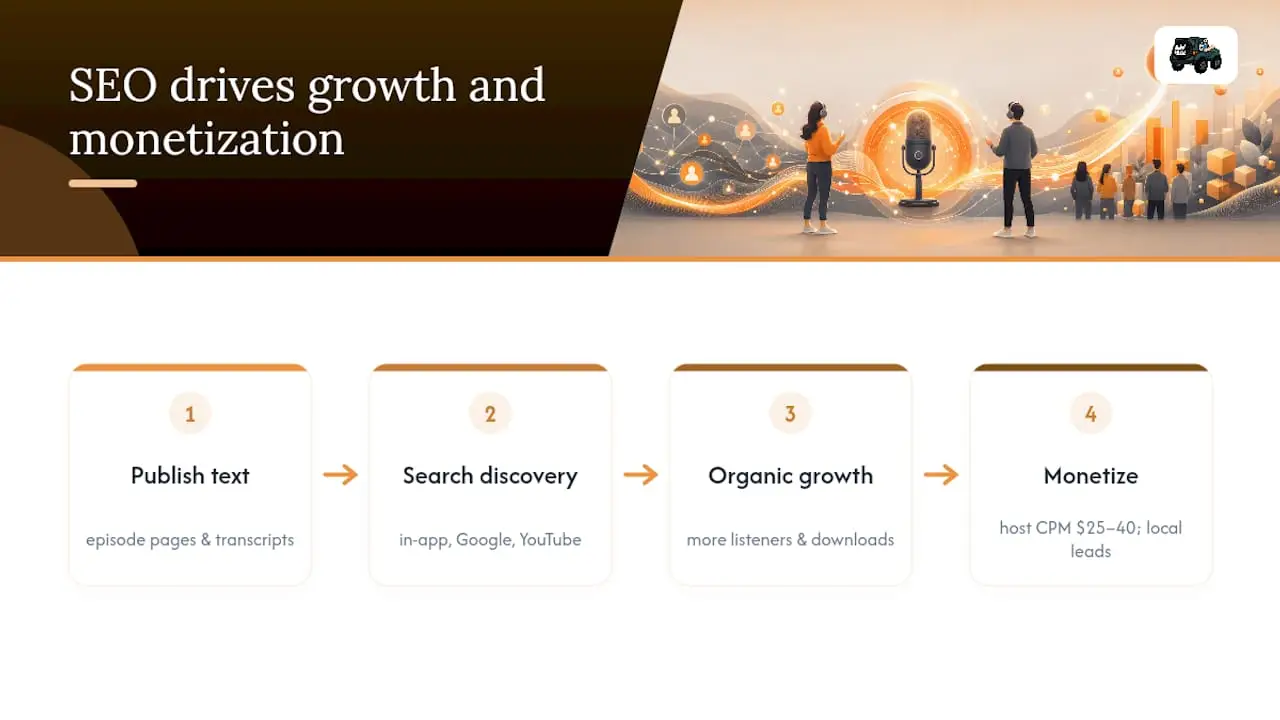
Podcast SEO matters because search and directory discovery together drive the majority of new-listener growth, and those gains compound over time rather than resetting like paid ad traffic does.
New listeners find shows through in-app search, Google and YouTube results, social sharing, and direct referrals. In-app search within Apple Podcasts and Spotify is the dominant discovery channel for established shows, but Google and YouTube are increasingly important for episode-level discovery, especially for niche topics where a listener types a question and lands on your episode page before they ever open a podcast app. That web-search path is entirely dependent on the text assets you publish.
The business outcomes are concrete. More organic listeners raise your download numbers, which directly affects sponsorship demand. Sponsorable’s benchmark data puts host-read mid-roll CPM consensus near $25–40, with programmatic running at roughly half that range. Rates vary by niche, format, and audience size, but the underlying driver is consistent: advertisers pay for engaged, growing audiences. Better discovery through SEO feeds that growth. For local businesses using podcasts as a lead channel, the math is even more direct: an episode page that ranks for a local search query drives qualified traffic to a landing page, not just passive listens.
There is also a compounding authority effect. Every transcript, episode page, and backlink adds to your domain’s topical authority. A show that has published 50 well-optimized episode pages with full transcripts has built a content asset that keeps generating impressions long after each episode airs. That is the core reason to treat podcast SEO as a system rather than a one-time fix. You can read more about how podcast marketing compares to radio advertising in terms of long-term ROI and audience conversion.
Plan podcast SEO before you record
The single most efficient change most creators can make is to incorporate keyword mapping and a page brief into the editorial calendar before recording begins. Retrofitting SEO after an episode is published is possible but slower and less effective than building it in from the start.
A repeatable pre-production workflow
- Research — Identify the primary keyword and 2–3 secondary keywords for the episode topic.
- Brief — Fill out an episode brief (template below) before writing the script or outline.
- Record — Reference the brief during recording so key phrases appear naturally in the audio.
- Transcribe and edit — Produce a clean, speaker-labeled transcript immediately after recording.
- Publish — Build the episode page with the transcript, show notes, JSON-LD, and canonical.
- Promote — Share the episode page URL (not just the directory link) across channels and pursue one backlink per episode.
Episode brief template fields
Use these fields for every episode before you hit record:
- Primary keyword (one phrase, 3–5 words)
- Secondary keywords (2–3 supporting phrases)
- Episode title draft (primary keyword in the first 5–7 words)
- Suggested H2s for show notes (mirrors the episode’s main segments)
- Timestamped segments (planned chapter markers for show notes and transcript)
- Call-to-action (one specific action you want listeners to take)
- Links to resources (internal episode links, guest links, sponsor mentions)
Editorial calendar structure
Map themes, primary keywords, and publishing dates so each episode serves a cluster goal. A simple structure: pick one pillar topic per month (for example, “local business marketing”), then plan four episodes that each target a long-tail variation (“podcast marketing for restaurants,” “how to start a business podcast on a budget,” “corporate podcast production tips,” “podcast attribution for local campaigns”). Each episode links back to the pillar page and to each other, building topical authority across the cluster. A step-by-step content calendar guide can help you build this structure if you are starting from scratch.
How to research keywords for your podcast episodes
Pick one primary keyword and 2–3 secondary keywords for each episode, and prioritize intent-matched long-tail queries for the fastest wins. Long-tail phrases have lower competition and higher conversion intent, which means a new or mid-sized show can rank for them faster than for broad head terms.
Tools and how to use them
Google Trends shows whether a topic is growing or declining in search interest. Type your seed topic and compare it against related phrases to find the version with rising momentum. For podcast-specific research, filter by category (Arts & Entertainment or Business & Industrial) to see how interest tracks within your niche.
Google Keyword Planner gives monthly search volume ranges and competition levels. Use it to validate that your chosen keyword has enough search demand to be worth targeting. Filter for phrases with low-to-medium competition and at least a few hundred monthly searches.
Ahrefs is the most powerful option for competitive analysis. Use the Keywords Explorer to see keyword difficulty, click-through rates, and the top-ranking pages for any phrase. The “Questions” filter inside Ahrefs is particularly useful for podcast topics because it surfaces the exact questions your audience types into Google, which translate directly into episode titles and show notes headings.
Exploding Topics surfaces trends before they peak in mainstream search volume. For creators who want to build authority on emerging topics before competition arrives, this is the tool to check monthly. A topic that is trending upward on Exploding Topics today may be a high-volume keyword in six months.
Step-by-step keyword selection
- Start with a seed topic that fits your show’s niche (for example, “business podcast production”).
- Run it through Google Trends to confirm interest is stable or growing.
- Expand in Google Keyword Planner or Ahrefs to find 10–15 related phrases.
- Filter by intent: prioritize informational queries (“how to start a business podcast”) and commercial-investigation queries (“best corporate podcast production services”).
- Score each phrase by opportunity: search volume divided by keyword difficulty. Pick the highest-opportunity phrase as your primary keyword.
- Assign the primary keyword to the episode title and the secondary keywords to show notes headings and the transcript.
Example decision logic: A creator planning an episode on podcast monetization might start with “podcast advertising rates.” Google Keyword Planner shows solid search volume. Ahrefs reveals that “podcast CPM rates” and “how much are podcast ads” have lower difficulty scores. The creator picks “podcast CPM rates” as the primary keyword (lower competition, clear intent) and uses “podcast advertising rates” and “podcast ad pricing” as secondary keywords in the show notes and description.
How to write episode titles, descriptions, and show notes that rank
The single best practice for episode titles is to make them specific, searchable, and front-loaded with the primary keyword within the first 5–7 words. Directories truncate long titles, and search engines weight the first words of a title tag more heavily than the last.
Title examples: what works and what does not
| Weak title | Strong title |
|---|---|
| “Episode 14: A Chat With Our Guest” | “Podcast CPM Rates Explained: What Advertisers Pay in 2026” |
| “Marketing Tips for Small Business Owners” | “Start a Business Podcast: A Step-by-Step Plan for Local Brands” |
| “Our Thoughts on Podcast Monetization” | “Podcast Ad Pricing: Host-Read vs. Programmatic Compared” |
The weak titles are vague, bury the topic, and give crawlers nothing to work with. The strong titles lead with the primary keyword, signal the episode’s specific value, and match the language a listener would type into a search bar.
Show notes structure
Show notes are not a summary of what you said. They are a standalone web document that earns its own search traffic. Structure them this way:
- 150–300 word summary above the fold, written in full sentences, with the primary keyword in the first paragraph.
- Timestamps for each major segment (format: 00:00 Introduction, 02:15 What drives podcast ad pricing, etc.).
- Guest bio with a link to the guest’s website (this creates a natural backlink opportunity when the guest shares the episode).
- Resources and links mentioned in the episode.
- Call-to-action tied to one specific next step.
- Related episodes with internal links to 2–3 thematically connected episodes.
Rev’s guidance on podcast transcription confirms that placing primary keywords in the episode title yields significantly higher search rankings than burying them only in descriptions. Front-load the keyword, then let the show notes carry the secondary phrases naturally.
Why transcripts are your primary ranking signal and how to publish them
Transcripts are the primary text signal search engines use to understand and rank your episodes. Publish a full, crawlable transcript on each episode page in plain HTML. Do not hide it behind JavaScript accordions, tabs, or “load more” buttons that remove the text from the initial HTML response. If a crawler cannot see the text in the page source, it does not exist for ranking purposes.
Podspun’s podcast SEO guide documents that transcripts represent the largest block of relevant text on an episode page and that each episode should have its own stable URL with a self-referencing canonical link. A single well-optimized episode page can rank for dozens of long-tail keywords once the full transcript is indexed.
Transcript formatting checklist
- Readable paragraphs: break the transcript into 3–5 sentence paragraphs grouped by topic, not by speaker turn.
- Speaker labels: use “Host:” and “Guest:” or actual names so readers can follow the conversation.
- Timestamps: add a timestamp every 2–3 minutes so users can jump to relevant sections.
- Highlighted quotes: pull 2–3 strong quotes into blockquotes or bold text so they stand out visually and give crawlers clear signal about the episode’s key claims.
- FAQ extraction: if the episode contains clear Q&A moments, pull them into a dedicated FAQ section at the bottom of the page.
Implementation steps
- Record and export the audio file.
- Run it through an automated transcription service (Microsoft’s transcription tools offer a practical starting point for editing workflow, per Microsoft Support guidance).
- Human-edit for accuracy: fix proper nouns, speaker labels, and punctuation.
- Place the full text in the HTML of the episode page, below the audio player and show notes summary.
- Add jump-to anchor links from the timestamps in the show notes to the corresponding transcript sections.
- Write a 2–3 sentence summary above the transcript that includes the primary keyword.
Pro Tip: Extract 3–5 Q&A pairs from the transcript and format them as FAQ schema on the episode page. AI answer engines like Perplexity and ChatGPT scrape crawlable text for citations. Without clean transcript HTML, these tools have nothing to quote from your episode even if the audio contains high-value insight. FAQ schema gives them a ready-made, citable format.
PodcastEpisode JSON-LD, RSS hygiene, and validators to run
Implement PodcastEpisode JSON-LD on every episode page and keep your RSS feed fields consistent with your episode pages. These two actions together tell both Google and podcast directories exactly what each episode is, when it was published, and where the authoritative version lives.
Google’s structured data documentation specifies that PodcastEpisode schema labels episode duration, publication date, and parent series, and that canonical links prevent third-party copies from outranking the creator’s original page.
Minimal PodcastEpisode JSON-LD example
{
  "@context": "https://schema.org",
  "@type": "PodcastEpisode",
  "name": "Podcast CPM Rates Explained: What Advertisers Pay in 2026",
  "description": "A breakdown of host-read and programmatic podcast ad pricing, CPM benchmarks, and how audience size affects sponsorship rates.",
  "datePublished": "2026-03-15",
  "duration": "PT32M",
  "url": "https://yourdomain.com/episodes/podcast-cpm-rates",
  "isPartOf": {
    "@type": "PodcastSeries",
    "name": "Your Show Name",
    "url": "https://yourdomain.com/podcast"
  },
  "episodeNumber": "42",
  "thumbnailUrl": "https://yourdomain.com/images/ep42-thumbnail.jpg"
}
Place this block in the <head> of the episode page inside a <script type="application/ld+json"> tag.
RSS tag checklist
Every episode entry in your RSS feed should include:
<title>matching the episode page title exactly<itunes:subtitle>populated with a secondary keyword phrase<description>or<content:encoded>with 500–4,000 characters of episode description<enclosure>with the correct audio file URL, length, and MIME type<guid>that is unique and permanent for each episode<pubDate>in RFC 2822 format
Validators to run before every submission
Run your feed through Podbase and Castfeedvalidator before submitting to any new directory and after any feed changes. Both tools flag malformed tags, missing required fields, and encoding errors that cause directories to skip or mis-index episodes. Fix every error the validators surface, not just the critical ones. A feed with warnings is a feed that may behave unpredictably in Apple Podcasts or Spotify’s ingestion pipeline.
Which directories to submit to and what metadata each one weights
Submit and maintain your feed in Apple Podcasts, Spotify, YouTube Music, Amazon Music, iHeart, and Podchaser. Each platform has its own metadata priorities, and a feed that is optimized for one is not automatically optimized for all.
Directory metadata priorities
- Apple Podcasts: weights the show title, subtitle, and category most heavily for in-app search. The subtitle field is your best opportunity to include a secondary keyword without disrupting the brand title. Category selection affects browse discovery as much as search.
- Spotify: indexes the show description and episode descriptions for its internal search. Write episode descriptions in full sentences with the primary keyword in the first line. Spotify also surfaces shows based on listener behavior data, so completion rates and saves matter.
- YouTube Music / Google Podcasts: Google indexes the episode page URL you submit via RSS. This is the platform where your episode page SEO has the most direct impact. A well-optimized episode page ranks in Google Search and surfaces in YouTube Music simultaneously.
- Amazon Music / Audible: uses the show title and episode title for search. Keep titles clean and keyword-forward. Amazon’s podcast catalog is growing, and early optimization here has lower competition than Apple or Spotify.
- iHeart: weights show title, category, and episode description. iHeart’s audience skews toward radio listeners, making it a strong channel for local and regional shows.
- Podchaser: functions as a podcast database and review platform. A complete Podchaser profile with accurate metadata improves your show’s credibility signals and generates backlinks to your episode pages.
Verification and maintenance checklist
- Submit your RSS feed URL to each directory’s submission portal.
- Verify ownership in Apple Podcasts Connect and Spotify for Podcasters.
- After any feed update (new episode, corrected description, artwork change), check each directory’s ingestion dashboard within 48 hours.
- Re-run Podbase and Castfeedvalidator after any structural feed change.
- Update show descriptions seasonally to reflect current topics and keywords.
Technical SEO levers that most podcasters overlook
Technical hygiene removes barriers to indexing and improves user experience, both of which support discoverability. Most of these items take under an hour to implement and rarely require a developer.
Technical levers to address
- ID3 tags: embed the episode title, show name, episode number, and a short description in the MP3 file’s ID3 metadata. Some aggregators and AI tools read ID3 data directly.
- Audio filenames: name files descriptively (“podcast-cpm-rates-ep42.mp3”) rather than generically (“episode42.mp3”). Clean filenames are a minor signal but cost nothing to fix.
- XML sitemap: include your episode page URLs in your site’s XML sitemap and submit it to Google Search Console. If your hosting platform generates an audio sitemap, submit that separately.
- Player embed: use an audio player that renders the transcript in the page HTML, not inside an iframe or JavaScript widget that hides text from crawlers. The player should be indexable.
- Lazy loading: if your episode pages lazy-load the transcript, test that Google’s crawler sees the full text. Use Google Search Console’s URL Inspection tool to render the page and confirm the transcript appears in the crawled HTML.
- Page speed: compress images, use a CDN, and minimize render-blocking scripts on episode pages. A slow page hurts both rankings and listener experience. Google’s ranking signals and algorithm behavior analysis confirms page speed remains a direct ranking factor.
- Mobile friendliness: test every episode page on mobile. Most podcast listeners discover content on a phone, and a page that renders poorly on mobile loses both rankings and conversions.
Technical checklist for your developer or hosting settings
- Confirm the audio player exposes transcript text in HTML source.
- Add PodcastEpisode JSON-LD to the page
<head>. - Add a self-referencing canonical tag to every episode page.
- Submit the XML sitemap to Google Search Console.
- Run a Core Web Vitals check via PageSpeed Insights and fix any “Poor” scores.
- Verify mobile rendering with Google’s Mobile-Friendly Test.
How to measure podcast SEO results and when to expect them
Track both web search metrics and podcast metrics to measure SEO impact. Neither set alone tells the full story: Search Console shows whether your episode pages are gaining impressions and clicks from Google, while hosting analytics show whether those web visitors are converting into listeners.
Metrics and tools
| Metric | What it answers | Tool |
|---|---|---|
| Impressions | Is Google indexing and surfacing my episode pages? | Google Search Console |
| Clicks and CTR | Are searchers clicking through to my episode pages? | Google Search Console |
| Top queries | Which keywords drive traffic to my episodes? | Google Search Console |
| Downloads per episode | Is overall listenership growing? | Hosting analytics (Buzzsprout, Transistor, etc.) |
| Completion rate | Are listeners finishing episodes? | Hosting analytics |
| Referral traffic | How much web traffic comes from search vs. social? | Google Analytics / GA4 |
| Page load time | Are slow pages hurting rankings and experience? | PageSpeed Insights |
The analytics in media guide covers how to combine these data sources into a single dashboard view.
Realistic timeline
- Days 1–14: Google indexes new episode pages. You will see impressions appear in Search Console, usually with low rankings initially.
- Weeks 3–8: Rankings begin to stabilize as Google assesses page quality, backlinks, and engagement signals. Expect movement on long-tail keywords first.
- Months 2–3: Consistent publishing and internal linking start to build topical authority. Episode pages from earlier in the run begin ranking for secondary keywords.
- Months 4–6: Compounding effects become visible. Older episodes continue generating impressions. Total monthly impressions grow even without new episodes being published.
Set a 60–90 day checkpoint to evaluate whether your primary keywords are moving. If impressions are flat after 90 days, the issue is usually one of three things: the episode pages are not indexed (check Search Console’s Coverage report), the keywords are too competitive, or the pages lack enough text (transcript is missing or hidden).
Common mistakes and quick wins you can fix this afternoon
The most common errors blocking podcast discovery are missing transcripts, no dedicated episode pages, and inconsistent metadata. Fixing these three issues yields faster gains than any other optimization.
Mistakes and immediate fixes
- No transcript on the episode page → Publish the full transcript in HTML on the episode page today. Even an unedited automated transcript is better than nothing.
- No dedicated episode page → Create a simple WordPress or CMS page for your next episode with the title, summary, audio player, and transcript. Use the episode URL as the canonical.
- Episode titles are vague or brand-first → Rewrite the title to lead with the primary keyword. “Episode 22: Our Interview” becomes “Podcast Host Read Ads: How to Write Them and What They Pay.”
- RSS feed has errors → Run Podbase and Castfeedvalidator right now. Fix every flagged error before your next episode publishes.
- No canonical tag on episode pages → Add a self-referencing canonical to every episode page. This is a one-line HTML addition.
- Show notes are one paragraph → Expand to 150–300 words with timestamps, links, and a CTA. This alone can double the keyword surface area of the page.
- No internal links between episodes → Add 2–3 links to related episodes in every new show notes page. This distributes authority across your episode archive.
- Not submitted to all major directories → Submit to Apple Podcasts, Spotify, YouTube Music, Amazon Music, iHeart, and Podchaser in one session.
Quick-action checklist for this afternoon
- Validate your RSS feed in Podbase.
- Add a canonical tag to your three most recent episode pages.
- Rewrite the title of your best-performing episode to front-load the primary keyword.
- Publish a transcript for one episode (use an automated service and do a light edit).
- Add timestamps to the show notes of your last three episodes.
- Submit your feed to any major directory where your show is not yet listed.
- Add internal links between your last five episodes.
Podcast SEO for local businesses: turning discoverability into customers
Local podcast SEO uses the same fundamentals as general podcast SEO but layers in local keywords, local citations, and location-specific CTAs to convert listeners into customers. For a Tampa restaurant, a local law firm, or a regional service brand, the goal is not just impressions; it is foot traffic, calls, and form submissions.
Local action steps
- Include NAP in episode pages: your business name, address, and phone number should appear on every episode page, ideally in the footer or a dedicated “About the Host” section. This reinforces local citation consistency.
- Target local keyword variations: instead of “business podcast production,” target “business podcast production Tampa” or “corporate podcast production for Florida brands.” These phrases have lower competition and higher conversion intent for local audiences.
- Invite local business guests: a guest appearance from a local business owner creates a natural backlink when they share the episode from their own site. This is one of the most efficient link-building tactics available to local shows. The podcast guest marketing guide covers this approach in detail.
- Create co-branded episodes: partner with a complementary local brand for a co-branded episode. Both parties promote the episode page, doubling the backlink and social signal potential.
- Build localized landing pages: pair each episode with a landing page that targets a local search query. A Tampa marketing agency running an episode on “how to start a business podcast” should have a landing page at
/start-a-business-podcast-tampathat the episode page links to.
Local conversion workflow
- Identify 3–5 local keyword targets for your show’s niche.
- Map one local keyword to each episode in your next content cluster.
- Build a localized landing page for your highest-priority keyword.
- Include a location-specific CTA in the episode show notes (“Book a free consultation with our Tampa team”).
- Track conversions from episode page traffic separately in GA4 using UTM parameters or a dedicated landing page URL.
Pro Tip: Bundle a local landing page with a paid social promotion of the episode. Run a short-form video clip of the episode to a local audience on Facebook or Instagram, drive clicks to the episode page, and retarget visitors with the landing page CTA. This paid-plus-organic combination accelerates the conversion loop that organic SEO alone takes months to build.
16wmediagroup has worked with local Tampa brands on exactly this kind of integrated podcast and local advertising strategy. You can see the Tampa brand podcast strategies that have driven measurable local engagement for regional clients.
The trade-offs most podcast SEO guides do not address
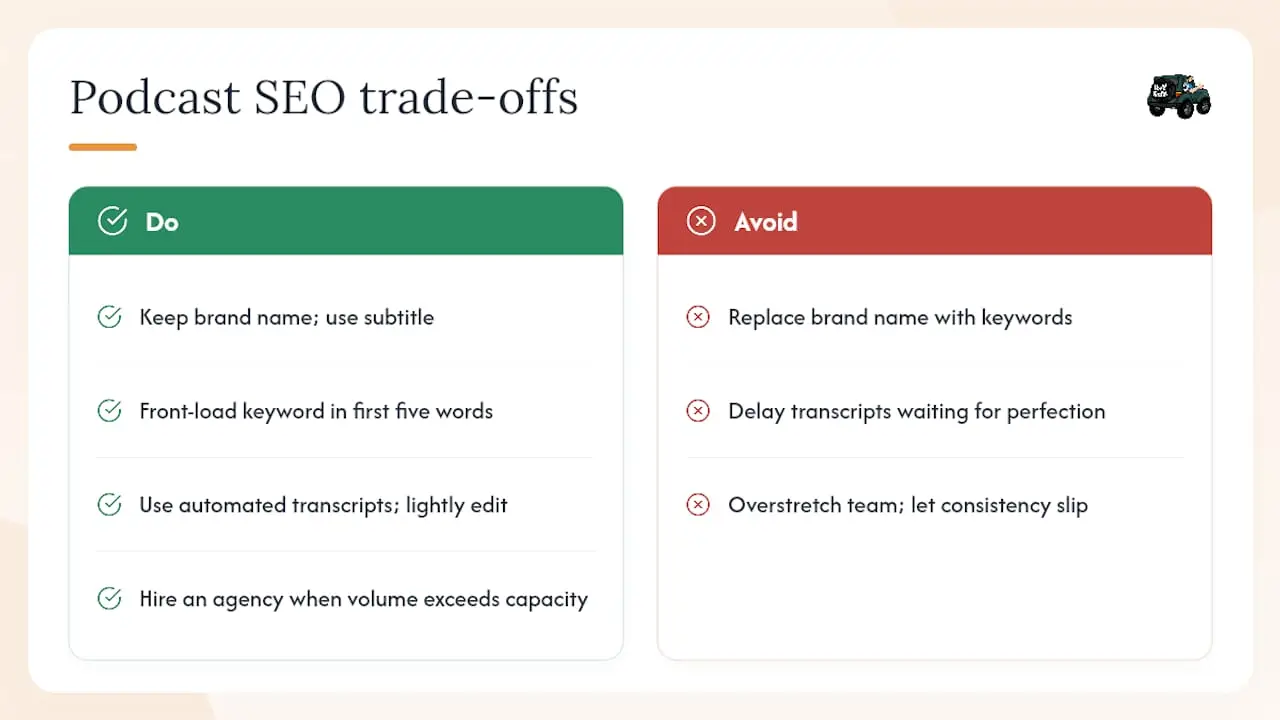
Most podcast SEO advice treats the episode title as a simple keyword placement exercise. It is not. The real tension is between brand identity and search discoverability, and it shows up most clearly when a show has a strong brand name that means nothing to a first-time searcher.
A show called “The Momentum Files” is memorable to existing listeners. To someone searching “how to start a business podcast,” it is invisible. The standard advice is to rename the show with a keyword in the title, but that is a blunt instrument that sacrifices brand equity for search volume. The smarter move is to use the subtitle field aggressively. Apple Podcasts and Spotify both display the subtitle in search results, and Google indexes it as part of the show’s metadata. A subtitle like “Business Podcast Production, Local Marketing, and Growth Strategy” gives you keyword coverage without touching the brand name.
The same logic applies at the episode level. If your show has a loyal audience that expects a certain naming convention, you do not have to abandon it entirely. Front-load the keyword in the first five words, then add the brand-style title after a colon. “Podcast Host Read Ads: The Momentum Files on Sponsorship Strategy” serves both audiences.
The other trade-off that gets underestimated is the effort-to-reward ratio of transcripts. Producing a clean, edited transcript for every episode takes real time, and many creators skip it for that reason. The compounding value of transcripts is not visible in the first 30 days, which makes it easy to deprioritize. But a show with 50 transcribed episodes has a text archive that keeps generating search impressions for years. A show with 50 audio-only episodes has nothing for crawlers to index. For small teams, the right call is to use automated transcription for speed and do a light edit rather than waiting for a perfect transcript that never gets published.
When the volume of optimization work outpaces what a small team can handle, that is the right moment to bring in an agency. Not because the tactics are complicated, but because consistency is what drives compounding results, and consistency is the first thing that slips when a team is stretched.
16wmediagroup can handle your podcast SEO from production to rankings
16wmediagroup builds and optimizes business podcasts for local brands that want measurable discovery, not just a published feed. The agency handles episode page creation, full transcript production and formatting, PodcastEpisode schema implementation, RSS validation, directory submission, and measurement dashboards that combine Search Console data with hosting analytics into a single view.
For local businesses in Tampa and surrounding markets, 16wmediagroup layers in local keyword targeting, localized landing pages, and co-branded episode campaigns that connect podcast discoverability directly to customer acquisition. The local advertising campaign planning guide outlines how these campaigns are structured from brief to results. If you want to see what a fully optimized episode page looks like for your show, the next step is a single-episode audit: view the full services overview and reach out to start the conversation.
Sources
These are the tools you need to validate, research, and scale your podcast SEO work. Each one addresses a specific gap in the optimization workflow.
- Podcast SEO strategies | Podcasting Authority
- Podcast Ad Rates & Sponsorship Costs (2026) | Sponsorable